
Field Debrief & Pilot Turnaround
Rapid 3-minute post-flight verification workflow for field operators before battery swap.
Verify flight completeness, airspace compliance, sensor capture coverage, and battery health before the next battery swap and launch.
Immediately after every field sortie before powering down the airframe or swapping batteries.
- DJI RC / Smart ControllerUSB-C Cable / Mass Storage mode
- Field Debrief LaptopChrome, Edge, or Firefox browser
- DJI Binary Flight RecordDJIFlightRecord_*.txt or .dat
Turnaround Protocol Flow
Extract Flight Log from Controller
Following landing and rotor spin-down, connect your DJI RC / RC Pro / Smart Controller to the field debrief workstation via a USB-C data cable.
When prompted on the controller screen, select "Transfer Files (MTP / Mass Storage)". Navigate to internal storage or the SD card directory located at:
Load into DJI Log Viewer (Edge Parser)
Open the zero-authentication SentinX DJI Flight Log Viewer in your workstation browser. The parser operates 100% on the client CPU using WebAssembly and Web Workers—no internet uplink or cloud credentials are required in remote field conditions.
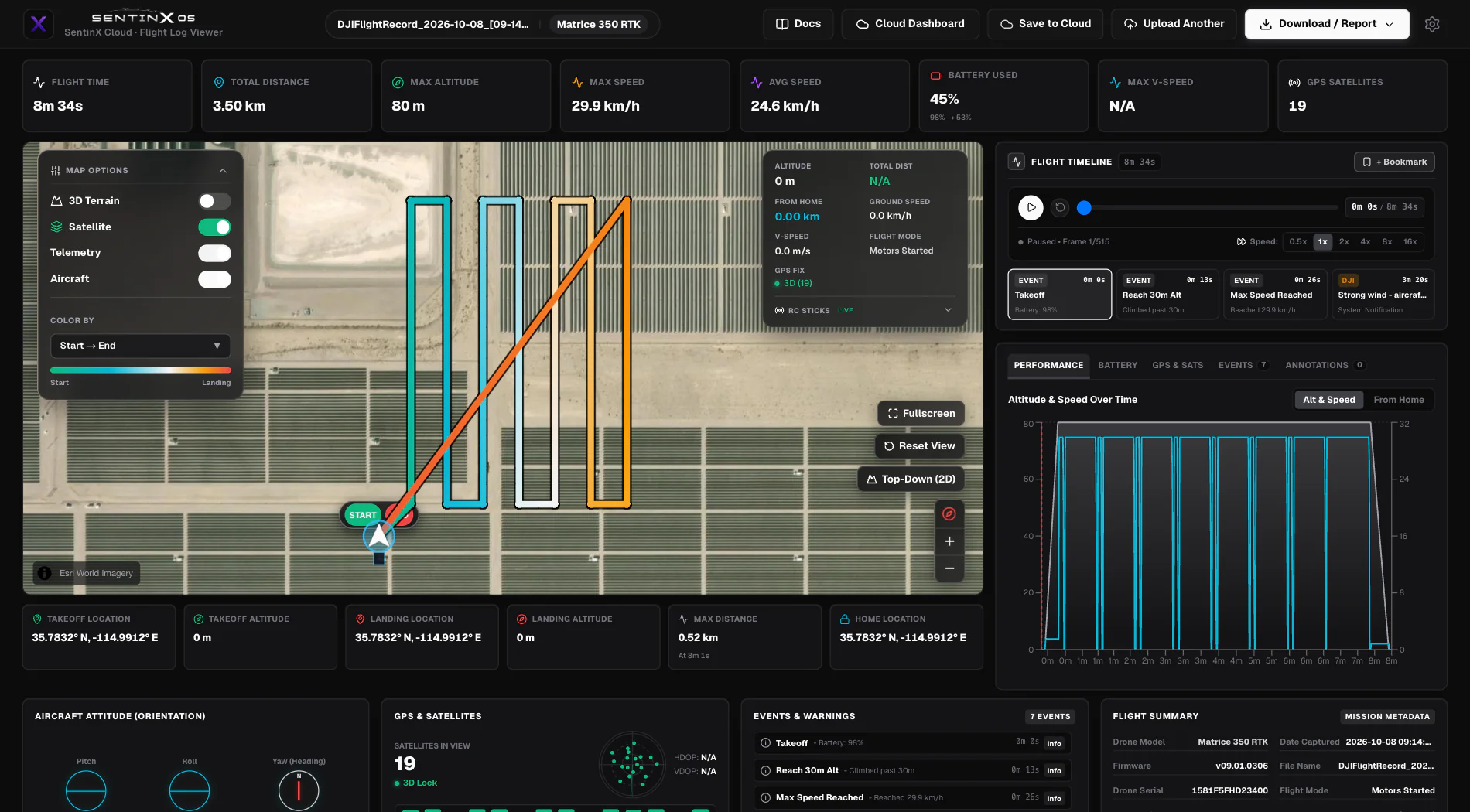
Review Key Telemetry & Alert Parameters
Inspect the HUD summary strip and the warning timeline. Ensure flight telemetry conforms to legal constraints and aircraft structural limits:
- Max Altitude (AGL): Verify flight stayed below authorized 120m (400 ft) ceiling.
- Battery Voltage Delta: Confirm uniform cell discharge without sudden voltage drop under throttle.
- Warning Console: Audit any compass deviation, GPS glitch, motor heating, or obstacle avoidance triggers.
Verify Flight Completeness & Sensor Coverage
Switch to the 2D/3D Trajectory Track to inspect the spatial coverage. Ensure the UAV completed all scheduled photogrammetry grid lines or asset inspection waypoints without premature Return-to-Home (RTH) cutoffs.
Cross-check the shutter trigger count logged in telemetry against expected camera image count on the payload SD card.
Clear for Battery Swap & Next Sortie
With the debrief verified and logged, safely power down the airframe. Conduct a quick tactile inspection of the propellers, motor bells, and gimbal assembly before inserting a freshly balanced battery pack.
Operational Field Checklist
Ready for Next Flight Sortie?
All Flight Parameters Verified
Telemetry exhibits normal envelope limits throughout all mission segments with zero fatal or unresolved warnings.
- Max Altitude within authorized ceiling
- Battery discharge balanced across all cells (delta < 0.05V)
- Zero motor overload or compass deviation events
Anomaly or Incomplete Telemetry Detected
A warning, telemetry drop, battery voltage spike, or sensor malfunction was identified during automated debrief parsing.
- Battery voltage drop >0.2V on sudden throttle application
- Compass recalibration warning or GNSS lock drop <10 sats
- Unexpected RTH trigger, motor heat flag, or pilot takeover
#Incident, and execute full telemetry investigation.Related Procedures & Protocols
Incident Investigation & Forensics
Deep-dive safety audit workflow for flyaways, pilot interventions, or collisions.
Routine Asset Inspection
Repeatable survey workflow for powerlines, cell towers, and wind turbines.
Zero-Auth Client Edge Parser
How SentinX parses proprietary DJI binary blackbox logs with 0ms server latency.